
Coffee table SketchUp models
Compare curved, circular, organic and sculptural table forms. These studies help you assess a tabletop against seating, understand different support shapes and practice material presentation.

Browse the collection
Choose a preview, open the model link and review the file in SketchUp before adding it to your study scene.
Hourglass Table Base
Study the narrowed middle and broader ends of the base. Add a simple temporary tabletop in your practice file and compare the resulting proportions from several angles.
Download SketchUp model ↧View in Google Drive ↗
Curved Coffee Table
Use the curved outline to explore a softer seating arrangement. Measure the imported footprint and compare how it fits between a sofa and an armchair.
Download SketchUp model ↧View in Google Drive ↗
Organic-Leg Table — Study A
Inspect how the organic support meets the top. Create a simplified alternative leg in a separate group and compare the silhouette without changing the original asset.
Download SketchUp model ↧View in Google Drive ↗
Organic-Leg Table — Study B
Compare this table variation with Study A. Focus on the space between supports and the apparent balance of the top, then save a side-by-side presentation scene.
Download SketchUp model ↧View in Google Drive ↗
Minimalist Table
Use the restrained table form for a proportion exercise. Compare tabletop thickness, overall height and the distance to neighboring seating before assigning contrasting finishes.
Download SketchUp model ↧View in Google Drive ↗
Cylindrical Side Table
Position the compact cylindrical form next to a chair. Practice checking the top height against the armrest and compare an isolated object view with a room composition.
Download SketchUp model ↧View in Google Drive ↗
Organic White Coffee Table
Study the rounded top and sculptural supports. Place the table in a simple lounge scene and use a plan view to compare its outline with the seating arrangement.
Download SketchUp model ↧View in Google Drive ↗
Round Marble-Look Coffee Table
Explore the contrast between the circular top and the ribbed base. Test texture scale and orientation in your file before preparing a close-up material study.
Download SketchUp model ↧View in Google Drive ↗
Marble-Look Side Table with Open Frame
Examine the slender open frame below the circular top. Compare it beside a lounge chair and inspect the curved base pattern from a low camera angle.
Download SketchUp model ↧View in Google Drive ↗
Suspended Sculptural Form
Treat this sculptural item as a decorative form study within the collection. Inspect its overlaps and create a separate display scene rather than assuming it is a conventional usable table.
Download SketchUp model ↧View in Google Drive ↗
Character-Supported Table
Use the character and tabletop as a playful scene-composition exercise. Check the overall scale against ordinary furniture and keep decorative geometry separate from room layout objects.
Download SketchUp model ↧View in Google Drive ↗
Sculptural Coffee Table
Compare the distinctive table form with a simpler rectangular placeholder. Use two saved scenes to see how the object changes the balance of a lounge composition.
Download SketchUp model ↧View in Google Drive ↗
Modern Coffee Table
Use this table as the anchor for a small seating study. Check the top dimensions and experiment with spacing from the sofa before adding decorative objects.
Download SketchUp model ↧View in Google Drive ↗Compare two tables in the same lounge
- Draw a simple sofa placeholder and keep it unchanged throughout the exercise. Import two table alternatives into separate groups.
- Measure each table and compare its height and footprint with the seating. Save plan views so decorative details do not hide layout differences.
- Use the same camera and lighting for both alternatives. Check the tabletop texture separately from the support geometry to make the comparison useful.
Use tables in a living-room layout · Organize your SketchUp file · Prepare a V-Ray presentation
For tool instructions, consult the official SketchUp guides to units, measuring distance and saved scenes.
Continue exploring
Learn a related technique
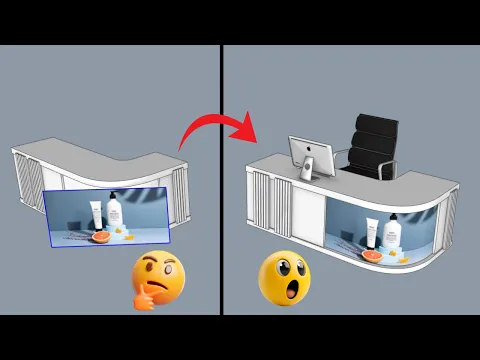
How To Put Textures On Curved Surfaces Super Easily!
Practice task: test a clearly patterned texture on one curved surface. Inspect seams and direction from multiple views before applying the same material across your room.
Watch on YouTube ↗