
Furniture SketchUp models
Explore chairs, dining sets, shelving and sculptural benches through small furniture studies. Each preview suggests a different exercise, from comparing upholstered shapes to arranging repeated seating.

Browse the collection
Choose a preview, open the model link and review the file in SketchUp before adding it to your study scene.
Padded Lounge Chair
Study the rounded upholstery and exposed side support. Place the chair beside a low table and compare the seat height and viewing angle in a small reading-corner exercise.
Download SketchUp model ↧View in Google Drive ↗
Round Dining Table and Four Chairs
Explore a circular dining arrangement with four surrounding chairs. Check chair spacing and the table footprint, then compare a seated view with a plan view of your layout.
Download SketchUp model ↧View in Google Drive ↗
Curved Modular Lounge Seating
Use the curved seating and small tables to practice arranging an informal meeting area. Test how the repeated segments affect circulation through the middle of the composition.
Download SketchUp model ↧View in Google Drive ↗
Integrated Bar and Seating
Explore the relationship between the tall vertical feature, bar surface and stools. Build a simple room around the composition and examine overhead clearance before changing its proportions.
Download SketchUp model ↧View in Google Drive ↗
Spiral Planter Stands
Study the twisting supports and circular planter openings. Try a simplified stand first, then compare the rhythm of repeated openings from front and side views.
Download SketchUp model ↧View in Google Drive ↗
Ribbed Curved Bench
Investigate the repeated slices that form the curved bench. Practice organizing one slice as a component and compare a sparse and dense repetition in a separate exercise.
Download SketchUp model ↧View in Google Drive ↗
Upholstered Dining Chair
Use the broad backrest and rounded seat as a furniture proportion study. Check the relationship between the back, seat and legs before placing copies around a dining table.
Download SketchUp model ↧View in Google Drive ↗
Red Sculptural Chair
Explore the continuous red curved profile as a form study. Compare the silhouette with a conventional chair and inspect the edges before experimenting with a different surface finish.
Download SketchUp model ↧View in Google Drive ↗
Rectangular Dining Table with Place Settings
Practice assembling a dining scene around the long table, chairs and place settings. Use a plan view to assess seating rhythm, then remove decorative items for a lighter study file.
Download SketchUp model ↧View in Google Drive ↗
Sofa, Armchair and Coffee Table Set
Develop a compact conversation area using the sofa, armchair and low table. Compare two seating orientations and keep an unobstructed route through the arrangement.
Download SketchUp model ↧View in Google Drive ↗
Grey and Green Armchair Pair
Compare two upholstered armchairs with contrasting finishes. Keep their geometry unchanged while testing fabric colors and the distance between seats in a living-room study.
Download SketchUp model ↧View in Google Drive ↗
Hollow Curved Bench
Explore a continuous wood-toned surface wrapped around an open end. Inspect the inner and outer faces, then test how the long silhouette fits along a wall.
Download SketchUp model ↧View in Google Drive ↗
Open Display Shelving
Practice arranging books and small objects within the tall open shelves. Compare the spacing of shelf levels and inspect the surrounding frame before making your own display variation.
Download SketchUp model ↧View in Google Drive ↗
Swivel Office Chair
Use the padded seat, armrests and wheeled base to study a desk setting. Check the chair position against the work surface and leave space to move away from the desk.
Download SketchUp model ↧View in Google Drive ↗
Spiral Decorative Sculpture
Study the ribbon-like surface around a vertical core. Change the camera angle to understand overlaps and compare how a simple neutral material reveals the twisting form.
Download SketchUp model ↧View in Google Drive ↗
Three-Drawer Storage Unit
Use the wood-toned fronts and white frame to practice a storage elevation. Check alignment between drawers and compare the unit with the wall and nearby furniture.
Download SketchUp model ↧View in Google Drive ↗Build a reading corner
- Choose one chair and draw a simple wall and floor around it. Measure the imported seat and overall footprint before placing a coffee table.
- Save two arrangements: one facing the room and one facing a window placeholder. Compare the route around the seat in plan view.
- Test one neutral finish first, then a contrasting fabric or wood texture. Inspect curved faces closely before producing a final scene.
Pair furniture with coffee tables · Organize your SketchUp file · Prepare a V-Ray presentation
For tool instructions, consult the official SketchUp guides to units, measuring distance and saved scenes.
Continue exploring
Learn a related technique
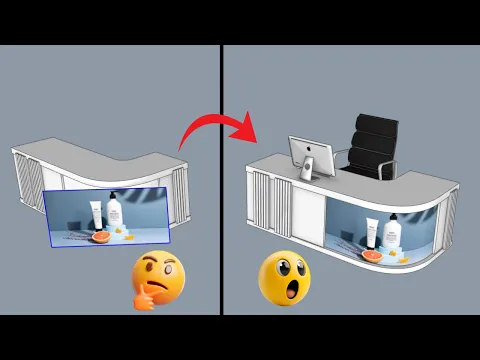
How To Put Textures On Curved Surfaces Super Easily!
Practice task: test a clearly patterned texture on one curved surface. Inspect seams and direction from multiple views before applying the same material across your room.
Watch on YouTube ↗